Tryout Flow
This page provides instructions to use the NextGenPsd2XS2AFramework API to provide the Account Information Service (AIS) as a sample. For more information, see the Try out section.
Before you begin:
Deploy the NextGenPsd2XS2AFramework API.
Generating application access token
Once you register the application, generate an application access token.
-
Run the following cURL command in a command prompt to generate the access token. Update the placeholders with relevant values.
Use the sample certificates for testing purposes. Click here to see how it is done...
-
Download the cert.pem and upload it to the client trust stores as follows:
-
The client trust stores for the Identity Server and API Manager are located in the following locations:
<APIM_HOME>/repository/resources/security/client-truststore.jks-
<IS_HOME>/repository/resources/security/client-truststore.jks -
Use the following commands to add the certificate to the client trust store:
keytool -import -alias cert -file <PATH_TO_CERT.PEM> -keystore client-truststore.jks -storepass wso2carbon - Open the
<APIM_HOME>/repository/conf/deployment.tomlfile and update the following configurations. Add the relevant signature algorithm supported by the certificate to the following configuration. Sample certificate supportsSHA1withRSAsignature algorithm:
Configure the issuer of the certificate as below if the certificate needs to be skipped form revocation validation.supported_signature_algorithms = ["SHA256withRSA", "SHA512withRSA", "SHA1withRSA"]
Configure as below if the test certificates are used:[[open_banking.gateway.certificate_management.certificate.revocation.excluded]] issuer_dn = "EMAILADDRESS=<EMAIL_ADDRESS>, CN=<COMMON_NAME>, OU=<ORGANIZATIONAL_UNIT>, O=<ORGANIZATION>, L=<LOCALITY>, ST=<STATE/PROVINCE>, C=<COUNTRY>"[[open_banking.gateway.certificate_management.certificate.revocation.excluded]] issuer_dn = "[email protected], CN=OB, OU=OB, O=WSO2, L=COL, ST=WP, C=LK" -
Restart the servers.
-
Download the following certificates and keys, and use them for testing purposes. Use the transport private key and transport public certificate for Transport layer security testing purposes. Use the signing certificate and signing private keys for signing purposes.
-
curl -X POST \
https://<IS_HOST>:9446/oauth2/token \
--cert <TRANSPORT_PUBLIC_KEY_FILE_PATH> --key <TRANSPORT_PRIVATE_KEY_FILE_PATH> \
-d 'grant_type=client_credentials&scope=accounts&client_id=<CLIENT_ID>'- Upon successful token generation, you can obtain a token as follows:
{
   "access_token":"eyJ4NXQiOiJOVGRtWmpNNFpEazNOalkwWXpjNU1tWm1PRGd3TVRFM01XWXdOREU1TVdSbFpEZzROemM0WkEiLCJraWQiOiJNell4TW1Ga09HWXdNV0kwWldObU5EY3hOR1l3WW1NNFpUQTNNV0kyTkRBelpHUXpOR00wWkdSbE5qSmtPREZrWkRSaU9URmtNV0ZoTXpVMlpHVmxOZ19SUzI1NiIsImFsZyI6IlJTMjU2In0.eyJzdWIiOiJhZG1pbkB3c28yLmNvbUBjYXJib24uc3VwZXIiLCJhdXQiOiJBUFBMSUNBVElPTiIsImF1ZCI6IlBTREdCLU9CLVVua25vd24wMDE1ODAwMDAxSFFRclpBQVgiLCJuYmYiOjE2NDY4OTEyNzIsImF6cCI6IlBTREdCLU9CLVVua25vd24wMDE1ODAwMDAxSFFRclpBQVgiLCJzY29wZSI6ImFjY291bnRzIiwiaXNzIjoiaHR0cHM6XC9cL2xvY2FsaG9zdDo5NDQ2XC9vYXV0aDJcL3Rva2VuIiwiY25mIjp7Ing1dCNTMjU2IjoieWJlcWFJbTUwMElNUHkxOVZrUGZIUlRKTnQ5cXZfUXQ1am1IZHQtYkptYyJ9LCJleHAiOjE2NDY4OTQ4NzIsImlhdCI6MTY0Njg5MTI3MiwianRpIjoiNGY4NDZkMDEtNGYwMS00OGEwLWI5YjItYjk3Yzc0ZmY1MWE4In0.cGQ8h0q9WqPM0VcqNLFz0fnWshPxuqNqJCwqierPjCS84pTK9vYVZqzy66-g-tNylFv9RzMYepOoFCFOcGfUAdtj_PR9GRLnRxKHgiCJMhiVEnZQ1kI0sSICqAB9ezGmtJgZwz2pqfnikCOFz-zTO0UumNDxJ48Qx6U4cr98aG34XLg4EKbvsCbIJuPPM1-sqRgPiQPKQ2EyNzHfRWeNPES5J8UhrIcVZ8pfrBqZ68eMFZxYQ7Bzg9Ch3PDcZyNYczGYFmNJD_pyoccZo5bSC7DDp9r4giQR2P_jL23N4AcKz0eww1FsTQOktBtRGrZ2-RT6zqh5kJ0E20BPYOv8Wg",
   "scope":"accounts",
   "token_type":"Bearer",
   "expires_in":3600
}
Initiating an account consent
This is where the AISP generates a request to get the consent of the PSU to access their account details. It defines the permissions, accounts and the nature of the consent. There are 3 main permission types for account consents.
- Accounts: permission to access the accounts information
- Balances: permission to access the accounts and its balance information
- Transactions: permission to access the accounts and its transaction information
Given below is a sample request for a Dedicated accounts consent. To learn more about consent types, see Types of consents.
-
Create a consent using the following request format:
curl -X POST \ https://<APIM_HOST>:8243/xs2a/v1/consents \ -H 'X-Request-ID: 16e987b2-0240-4d15-8a14-5c087a7d2983' \ -H 'Date: Tue, 22 Mar 2022 18:34:09 IST' \ -H 'PSU-IP-Address: 127.0.1.1' \ -H 'PSU-ID: [email protected]' \ -H 'PSU-ID-Type: email' \ -H 'Digest: SHA-256=Ok7xAw71C+4cOdnhJQwqgqwt8J+31XCJjN30OONpdb8=' \ -H 'Signature: keyId="SN=de730ec5733ead1b,CA=1.2.840.113549.1.9.1=#16116d616c7368616e694077736f322e636f6d,CN=OpenBanking Pre-Production Issuing CA,OU=OpenBanking,O=WSO2 (UK) LIMITED,L=COL,ST=WP,C=LK",algorithm="rsa-sha256", headers="digest x-request-id date psu-id",signature=S17Ut7kbRvFJlC8aaHxkidp3scgI9L5nBiqIlrHBp5xdaUQs0lfcXAsUgHL0QUJHMcsFfXbj0ns45qVIE4tJvvOXRFkNyPCIcTU4RAZB0JJNbySB/MOBZI27FxVuB+QepDtaj4DHbLBTze+8J78JqDKFXqTuZJPTTy3oo6WC+nfAEsQ63QttZ44oHyQMSc8hstFugfIjxp7x3eFxe7T5xeJzdA9x2gCFYz2EekexZkQZnHjcHdvgcbnsCjQZI2snFOe4XJ+ubS/m5oKZ7BVQcwPuEyo3aiROe1x0Dewh07IbrETyMJjy/2svNMX4Q3roQC77ARIpgg52XBYelTfHjw==' \ -H 'TPP-Signature-Certificate: MIIFdzCCA1+gAwIBAgIJAN5zDsVzPq0bMA0GCSqGSIb3DQEBBQUAMIGsMQswCQYDVQQGEwJMSzELMAkGA1UECAwCV1AxDDAKBgNVBAcMA0NPTDEaMBgGA1UECgwRV1NPMiAoVUspIExJTUlURUQxFDASBgNVBAsMC09wZW5CYW5raW5nMS4wLAYDVQQDDCVPcGVuQmFua2luZyBQcmUtUHJvZHVjdGlvbiBJc3N1aW5nIENBMSAwHgYJKoZIhvcNAQkBFhFtYWxzaGFuaUB3c28yLmNvbTAeFw0yMjAxMTgwNzI4MzdaFw0yNDAxMTgwNzI4MzdaMHMxCzAJBgNVBAYTAkdCMRowGAYDVQQKDBFXU08yIChVSykgTElNSVRFRDErMCkGA1UEYQwiUFNER0ItT0ItVW5rbm93bjAwMTU4MDAwMDFIUVFyWkFBWDEbMBkGA1UEAwwSMDAxNTgwMDAwMUhRUXJaQUFYMIIBIjANBgkqhkiG9w0BAQEFAAOCAQ8AMIIBCgKCAQEA1rhjeBrT0+nb/VaHYrkgNodKUlShQvXHL8/sb1q+sVt459LqX8SDYemp01OWWKv45TBv9WtUVl8T08Zc2n5Q6ha7BKVjXaSsDhkXj7TrOAwBxRWnNjNivvyb4n4Gxek+AcgozEUFj1MHeIkgywEzP3DUNkbZiQjw7LFxLOy9Bh00f089DrCRHxEnUPka9BdRS9M0GWIuMVxn+FxmbZIl7wVxc8t2xFd4uWGtvBX1EbWLYJr1/j5fgjHCSmkj23Ar+6oqv2AKpp9HJ2aeYJozHRy+4asSjTuYeobULGIaSxgPGOJg4fprs+2UKpV2z2B6RMDf78WQJoGn+lm4wLtKWwIDAQABo4HTMIHQMA4GA1UdDwEB/wQEAwIGwDAdBgNVHQ4EFgQUIprePFwGvrdfcP6t14Y5TzPPgJowgZ4GCCsGAQUFBwEDBIGRMIGOMBMGBgQAjkYBBjAJBgcEAI5GAQYCMHcGBgQAgZgnAjBtMEYwRAYHBACBmCcBAQwGUFNQX0FTBgcEAIGYJwECDAZQU1BfUEkGBwQAgZgnAQMMBlBTUF9BSQYHBACBmCcBBAwGUFNQX0lDDBtGaW5hbmNpYWwgQ29uZHVjdCBBdXRob3JpdHkMBkdCLUZDQTANBgkqhkiG9w0BAQUFAAOCAgEAsuTEC6j8u7lGEpSeVekcUXby9DPRaI6He7MW2K9f6nz12nleyUnvQVQqoFUF+kywRgGpIP/9HsI12NYwLVfgm9LJWR+ObBMWDH1OUqgxgy+Pj4+udiR8FJQsEdY6eF4lgfQq6SU+naMFCcJhuIFEVjItiC71nVg2PPdaXRwxOlXhuIpfW3DdIaELNffoVKYxnx/wpRGRAbTFI87pDdqZ/2sbkbnt4Lq+7VIQmdqqrMCIvPqh8n6/I5xotq8kPbBcf7/1wjUDClqX5chBh89sxZhIyRtOq3HiVzQ2c6sYgA640LsxHB4yPWFDv5tPnzohmDmfCYcvbSZhsGm+hlyjaf8/gN8cG+ui7PFKuyI0NUnR3rD88gIzl2lT1Wtw9f2eFkS8NSnB3ENhRYPLcvZDePktOjkj5PEqo4OTZgGnoMzXNvzWaABrcpzw7a1WF7swvvZavUg9bvFbbeVloDZj4w9ODICoe/Sy+2nZBRTVzIHGJ4kNzscXXSMsSD9sXZMT/JmmD+cs/X/9SJzAsunXqpHbTB9PiGWdR7rhk6e0ddwwTa7wLs/h2MOP8LyTVaHQtNXe8x54YwDCP98dZ1G76iLKIZoU84aYcGp7E8tlQl05UhunlTNe+WxWvBt9tWeotaOomSqGRWDk+4j5z91NoFuFQ81aDAJxB8RYI2I1sk8=' \ -H 'Authorization: Bearer <APPLICATION_ACCESS_TOKEN>' \ -H 'Content-Type: application/json; charset=UTF-8' \ -H 'Accept: */*' \ --cert <TRANSPORT_PUBLIC_KEY_FILE_PATH> --key <TRANSPORT_PRIVATE_KEY_FILE_PATH> \ -d '{ "access": { "accounts": [ { "iban": "DE98765432109876543210" } ], "balances": [ { "iban": "DE98765432109876543210" } ], "transactions": [ { "iban": "DE98765432109876543210" } ] }, "recurringIndicator": true, "validUntil": "2022-03-22", "frequencyPerDay": 4, "combinedServiceIndicator": false }' -
The response contains a Consent Id. A sample response is as follows:
{
   "consentId":"fe3efd03-93c9-4b6b-8f9c-e1d16ce054da",
   "chosenScaMethod":{
      "authenticationVersion":"1.0",
      "name":"SMS OTP on Mobile",
      "authenticationType":"SMS_OTP",
      "explanation":"SMS based one time password",
      "authenticationMethodId":"sms-otp"
   },
   "_links":{
      "scaStatus":{
         "href":"/v1/consents/fe3efd03-93c9-4b6b-8f9c-e1d16ce054da/authorisations/0dfb97c4-53c3-4134-a9ca-5ad1ba41edb9"
      },
      "scaOAuth":{
         "href":"https://localhost:8243/.well-known/openid-configuration"
      },
      "self":{
         "href":"/v1/consents/fe3efd03-93c9-4b6b-8f9c-e1d16ce054da"
      },
      "status":{
         "href":"/v1/consents/fe3efd03-93c9-4b6b-8f9c-e1d16ce054da/status"
      }
   },
   "consentStatus":"received"
}
Authorizing a consent
The AISP application redirects the PSU to authenticate and approve/deny the provided consent. This can be achieved in 2 ways: 1. Implicit flow 2. Explicit flow
The TPP decides the approach using TPP-Explicit-Authorisation-Preferred, which is an optional boolean header.
This header is sent during the consent initiation request. If the header is not present, Implicit approach is followed.
Implicit authorisation flow
The Implicit authorisation flow is as follows:
- The ASPSP creates an authorisation sub-resource implicitly after the account consent is received.
- The ASPSP replies with the well-known configuration of the Identity Server in the
_linkssection of the response. - The TPP generates the authorisation URL using the well-known URL.
- The PSU goes through the authorisation flow with that authorisation URL.
Explicit authorisation flow
The Explicit authorisation flow is as follows:
-
Once the consent is granted, the ASPSP replies with one of the
startAuthorisationlinks in the_linkssection of the response.curl -X POST \ https://<APIM_HOST>:8243/xs2a/v1/consents \ -H 'X-Request-ID: 1887ff9a-4365-45e4-9de8-135d0f4e176b' \ -H 'Date: Tue, 29 Mar 2022 00:01:48 IST' \ -H 'PSU-IP-Address: 127.0.1.1' \ -H 'Authorization: Bearer <APPLICATION_ACCESS_TOKEN>' \ -H 'PSU-ID: [email protected]' \ -H 'PSU-ID-Type: email' \ -H 'TPP-Explicit-Authorisation-Preferred: true' \ -H 'Accept: */*' \ -H 'Digest: SHA-256=AMaSdqaBP/cEf8FVEKcSZqXXOh9kOgj7e3iyXzdU0vSZ' \ -H 'Signature: keyId="SN=de730ec5733ead1b,CA=1.2.840.113549.1.9.1=#16116d616c7368616e694077736f322e636f6d,CN=OpenBanking Pre-Production Issuing CA,OU=OpenBanking,O=WSO2 (UK) LIMITED,L=COL,ST=WP,C=LK",algorithm="rsa-sha256", headers="digest x-request-id date psu-id",signature=o85+f6fW9yv3mlaCTrU/MnoewP/gj2Pu0zssONSFyQF0WZJF/4iamH60ulkEbJXyjAA5UZg2B+nW/H7V9s9yKoFNwcOzSWEyC6Z3hlIO9G6ckC/WLsqo+X1d40YMrbVhBrvVlI/GR5apQmBvcYeM21yf51ZIxC3uwbjjbCT3tT86IaL+xeHGmShgDtTDr+74PF3pptIdTSgx7RNvuwFKFjdk/qnK0Q/3dcPC2B9uhtPkagfBQHVECKFhuZY12OIVmihRx4aglCeFecnJAtjMDnFmK/ITKXobGUVe0pBmJdT+KwO2p2ieNv2vO49yt3o3qJsY2WpByQxSD8sQi3UeCQ==' \ -H 'TPP-Signature-Certificate: MIIFdzCCA1+gAwIBAgIJAN5zDsVzPq0bMA0GCSqGSIb3DQEBBQUAMIGsMQswCQYDVQQGEwJMSzELMAkGA1UECAwCV1AxDDAKBgNVBAcMA0NPTDEaMBgGA1UECgwRV1NPMiAoVUspIExJTUlURUQxFDASBgNVBAsMC09wZW5CYW5raW5nMS4wLAYDVQQDDCVPcGVuQmFua2luZyBQcmUtUHJvZHVjdGlvbiBJc3N1aW5nIENBMSAwHgYJKoZIhvcNAQkBFhFtYWxzaGFuaUB3c28yLmNvbTAeFw0yMjAxMTgwNzI4MzdaFw0yNDAxMTgwNzI4MzdaMHMxCzAJBgNVBAYTAkdCMRowGAYDVQQKDBFXU08yIChVSykgTElNSVRFRDErMCkGA1UEYQwiUFNER0ItT0ItVW5rbm93bjAwMTU4MDAwMDFIUVFyWkFBWDEbMBkGA1UEAwwSMDAxNTgwMDAwMUhRUXJaQUFYMIIBIjANBgkqhkiG9w0BAQEFAAOCAQ8AMIIBCgKCAQEA1rhjeBrT0+nb/VaHYrkgNodKUlShQvXHL8/sb1q+sVt459LqX8SDYemp01OWWKv45TBv9WtUVl8T08Zc2n5Q6ha7BKVjXaSsDhkXj7TrOAwBxRWnNjNivvyb4n4Gxek+AcgozEUFj1MHeIkgywEzP3DUNkbZiQjw7LFxLOy9Bh00f089DrCRHxEnUPka9BdRS9M0GWIuMVxn+FxmbZIl7wVxc8t2xFd4uWGtvBX1EbWLYJr1/j5fgjHCSmkj23Ar+6oqv2AKpp9HJ2aeYJozHRy+4asSjTuYeobULGIaSxgPGOJg4fprs+2UKpV2z2B6RMDf78WQJoGn+lm4wLtKWwIDAQABo4HTMIHQMA4GA1UdDwEB/wQEAwIGwDAdBgNVHQ4EFgQUIprePFwGvrdfcP6t14Y5TzPPgJowgZ4GCCsGAQUFBwEDBIGRMIGOMBMGBgQAjkYBBjAJBgcEAI5GAQYCMHcGBgQAgZgnAjBtMEYwRAYHBACBmCcBAQwGUFNQX0FTBgcEAIGYJwECDAZQU1BfUEkGBwQAgZgnAQMMBlBTUF9BSQYHBACBmCcBBAwGUFNQX0lDDBtGaW5hbmNpYWwgQ29uZHVjdCBBdXRob3JpdHkMBkdCLUZDQTANBgkqhkiG9w0BAQUFAAOCAgEAsuTEC6j8u7lGEpSeVekcUXby9DPRaI6He7MW2K9f6nz12nleyUnvQVQqoFUF+kywRgGpIP/9HsI12NYwLVfgm9LJWR+ObBMWDH1OUqgxgy+Pj4+udiR8FJQsEdY6eF4lgfQq6SU+naMFCcJhuIFEVjItiC71nVg2PPdaXRwxOlXhuIpfW3DdIaELNffoVKYxnx/wpRGRAbTFI87pDdqZ/2sbkbnt4Lq+7VIQmdqqrMCIvPqh8n6/I5xotq8kPbBcf7/1wjUDClqX5chBh89sxZhIyRtOq3HiVzQ2c6sYgA640LsxHB4yPWFDv5tPnzohmDmfCYcvbSZhsGm+hlyjaf8/gN8cG+ui7PFKuyI0NUnR3rD88gIzl2lT1Wtw9f2eFkS8NSnB3ENhRYPLcvZDePktOjkj5PEqo4OTZgGnoMzXNvzWaABrcpzw7a1WF7swvvZavUg9bvFbbeVloDZj4w9ODICoe/Sy+2nZBRTVzIHGJ4kNzscXXSMsSD9sXZMT/JmmD+cs/X/9SJzAsunXqpHbTB9PiGWdR7rhk6e0ddwwTa7wLs/h2MOP8LyTVaHQtNXe8x54YwDCP98dZ1G76iLKIZoU84aYcGp7E8tlQl05UhunlTNe+WxWvBt9tWeotaOomSqGRWDk+4j5z91NoFuFQ81aDAJxB8RYI2I1sk8=' \ -H 'Content-Type: application/json; charset=UTF-8' \ --cert <TRANSPORT_PUBLIC_KEY_FILE_PATH> --key <TRANSPORT_PRIVATE_KEY_FILE_PATH> \ -d '{ "access": { "accounts": [ { "iban": "DE98765432109876543210" } ], "balances": [ { "iban": "DE98765432109876543210" } ], "transactions": [ { "iban": "DE98765432109876543210" } ] }, "recurringIndicator": true, "validUntil": "2022-03-29", "frequencyPerDay": 4, "combinedServiceIndicator": false }'{ "consentId":"0a973008-8084-46b1-806b-8aca42cbf810", "chosenScaMethod":{ "authenticationVersion":"1.0", "name":"SMS OTP on Mobile", "authenticationType":"SMS_OTP", "explanation":"SMS based one time password", "authenticationMethodId":"sms-otp" }, "_links":{ "self":{ "href":"/v1/consents/f6d4bbef-c11c-4ea6-849c-b2304cf52e45" }, "startAuthorisationWithPsuIdentification":{ "href":"/v1/consents/0a973008-8084-46b1-806b-8aca42cbf810/authorisations" }, "status":{ "href":"/v1/consents/0a973008-8084-46b1-806b-8aca42cbf810/status" } }, "consentStatus":"received" } -
The TPP uses the
startAuthorisationlink to create an authorisation sub-resource explicitly.curl -X POST \ https://<APIM_HOST>:8243/xs2a/v1/consents/0a973008-8084-46b1-806b-8aca42cbf810/authorisations \ -H 'X-Request-ID: 10646d47-264c-4ae4-b180-16a8ec775d22' \ -H 'Date: Tue, 29 Mar 2022 00:16:38 IST' \ -H 'PSU-IP-Address: 127.0.1.1' \ -H 'Authorization: Bearer <APPLICATION_ACCESS_TOKEN>' \ -H 'PSU-ID: [email protected]' \ -H 'PSU-ID-Type: email' \ -H 'Accept: */*' \ -H 'Digest: SHA-256=RBNvo1WzZ4oRRq0W9+hknpT7T8If536DEMBg9hyq/4o=' \ -H 'Signature: keyId="SN=de730ec5733ead1b,CA=1.2.840.113549.1.9.1=#16116d616c7368616e694077736f322e636f6d,CN=OpenBanking Pre-Production Issuing CA,OU=OpenBanking,O=WSO2 (UK) LIMITED,L=COL,ST=WP,C=LK",algorithm="rsa-sha256", headers="digest x-request-id date psu-id",signature=pvY8Y7q6OCupbm9ESMcd8QZ2HqpMVhx6MGeUDouLmL1TkAUnRkTYOaWGnaVMZZC1ggPTwqu5/Xn9mp3JGPoEv/833tfvqCuVkJfjBebnLQvXk2TXBXOgh0Bmu+8iZVMEJD2r666+0gayhzBYUSOWLm2enOACcEbMetjYTG1vlvYVYjLeNC+DsDQp6b+0B0oQ8wHa2u2g1XDIYgl7Xl34ET6CRKCNyH+SqZXovVnLmctBCKzMJU1Sh1UxaGVkRhyAUG/h57swWOfr83DQkl2zMYDONZA5Tn3te3ewkz/OdJjyb9jUe+/lhPvOolOSlwFbUrTo88WOI+Eja+HBCzG27Q==' \ -H 'TPP-Signature-Certificate: MIIFdzCCA1+gAwIBAgIJAN5zDsVzPq0bMA0GCSqGSIb3DQEBBQUAMIGsMQswCQYDVQQGEwJMSzELMAkGA1UECAwCV1AxDDAKBgNVBAcMA0NPTDEaMBgGA1UECgwRV1NPMiAoVUspIExJTUlURUQxFDASBgNVBAsMC09wZW5CYW5raW5nMS4wLAYDVQQDDCVPcGVuQmFua2luZyBQcmUtUHJvZHVjdGlvbiBJc3N1aW5nIENBMSAwHgYJKoZIhvcNAQkBFhFtYWxzaGFuaUB3c28yLmNvbTAeFw0yMjAxMTgwNzI4MzdaFw0yNDAxMTgwNzI4MzdaMHMxCzAJBgNVBAYTAkdCMRowGAYDVQQKDBFXU08yIChVSykgTElNSVRFRDErMCkGA1UEYQwiUFNER0ItT0ItVW5rbm93bjAwMTU4MDAwMDFIUVFyWkFBWDEbMBkGA1UEAwwSMDAxNTgwMDAwMUhRUXJaQUFYMIIBIjANBgkqhkiG9w0BAQEFAAOCAQ8AMIIBCgKCAQEA1rhjeBrT0+nb/VaHYrkgNodKUlShQvXHL8/sb1q+sVt459LqX8SDYemp01OWWKv45TBv9WtUVl8T08Zc2n5Q6ha7BKVjXaSsDhkXj7TrOAwBxRWnNjNivvyb4n4Gxek+AcgozEUFj1MHeIkgywEzP3DUNkbZiQjw7LFxLOy9Bh00f089DrCRHxEnUPka9BdRS9M0GWIuMVxn+FxmbZIl7wVxc8t2xFd4uWGtvBX1EbWLYJr1/j5fgjHCSmkj23Ar+6oqv2AKpp9HJ2aeYJozHRy+4asSjTuYeobULGIaSxgPGOJg4fprs+2UKpV2z2B6RMDf78WQJoGn+lm4wLtKWwIDAQABo4HTMIHQMA4GA1UdDwEB/wQEAwIGwDAdBgNVHQ4EFgQUIprePFwGvrdfcP6t14Y5TzPPgJowgZ4GCCsGAQUFBwEDBIGRMIGOMBMGBgQAjkYBBjAJBgcEAI5GAQYCMHcGBgQAgZgnAjBtMEYwRAYHBACBmCcBAQwGUFNQX0FTBgcEAIGYJwECDAZQU1BfUEkGBwQAgZgnAQMMBlBTUF9BSQYHBACBmCcBBAwGUFNQX0lDDBtGaW5hbmNpYWwgQ29uZHVjdCBBdXRob3JpdHkMBkdCLUZDQTANBgkqhkiG9w0BAQUFAAOCAgEAsuTEC6j8u7lGEpSeVekcUXby9DPRaI6He7MW2K9f6nz12nleyUnvQVQqoFUF+kywRgGpIP/9HsI12NYwLVfgm9LJWR+ObBMWDH1OUqgxgy+Pj4+udiR8FJQsEdY6eF4lgfQq6SU+naMFCcJhuIFEVjItiC71nVg2PPdaXRwxOlXhuIpfW3DdIaELNffoVKYxnx/wpRGRAbTFI87pDdqZ/2sbkbnt4Lq+7VIQmdqqrMCIvPqh8n6/I5xotq8kPbBcf7/1wjUDClqX5chBh89sxZhIyRtOq3HiVzQ2c6sYgA640LsxHB4yPWFDv5tPnzohmDmfCYcvbSZhsGm+hlyjaf8/gN8cG+ui7PFKuyI0NUnR3rD88gIzl2lT1Wtw9f2eFkS8NSnB3ENhRYPLcvZDePktOjkj5PEqo4OTZgGnoMzXNvzWaABrcpzw7a1WF7swvvZavUg9bvFbbeVloDZj4w9ODICoe/Sy+2nZBRTVzIHGJ4kNzscXXSMsSD9sXZMT/JmmD+cs/X/9SJzAsunXqpHbTB9PiGWdR7rhk6e0ddwwTa7wLs/h2MOP8LyTVaHQtNXe8x54YwDCP98dZ1G76iLKIZoU84aYcGp7E8tlQl05UhunlTNe+WxWvBt9tWeotaOomSqGRWDk+4j5z91NoFuFQ81aDAJxB8RYI2I1sk8=' \ -H 'Content-Type: application/json; charset=UTF-8' \ --cert <TRANSPORT_PUBLIC_KEY_FILE_PATH> --key <TRANSPORT_PRIVATE_KEY_FILE_PATH> \ -d '{ }'{ "authorisationId":"33041682-2927-4012-9a33-635b3038b06b", "scaStatus":"received", "chosenScaMethod":{ "authenticationVersion":"1.0", "name":"SMS OTP on Mobile", "authenticationType":"SMS_OTP", "explanation":"SMS based one time password", "authenticationMethodId":"sms-otp" }, "_links":{ "scaStatus":{ "href":"/v1/consents/0a973008-8084-46b1-806b-8aca42cbf810/authorisations/33041682-2927-4012-9a33-635b3038b06b" }, "scaOAuth":{ "href":"https://localhost:8243/.well-known/openid-configuration" } } } -
The ASPSP replies with the well-known configuration of the Identity Server in the
_linkssection of the response. - The TPP generates the authorisation URL using the well-known URL.
-
PSU goes through the authorisation flow with that authorisation URL.
Multiple SCA of more than one PSU (Multi-authorization)
- For some accounts, more than one PSU has to give its consent before accessing this account. In this case, Strong Customer Authentication (SCA) has to be executed by more than one PSU.
- In a multi-authorization scenario, the steps 2 to 5 must be repeated n number of times for n number of PSUs.
The consent becomes
validonly after all the PSUs approve it.
Authorisation URL
Regardless of the authorisation flow, once the well-known configuration of the Identity Server is obtained, the TPP must generate an authorisation URL for the PSU to authorise the consent. This authorisation URL must be authorised by n number of PSUs in a multi-level authorisation context.
-
The ASPSP sends the request to the PSU stating the accounts and information that the TPP wishes to access. The
request is a URL in the format given below. Update the placeholders with relevant values and run this in a browser to prompt the invocation of the authorize API:https://<IS_HOST>:9446/oauth2/authorize/?scope=<YOUR_SCOPES>&response_type=code&redirect_uri=<REDIRECT_URI>&state=<DYNAMICALLY_SET_VALUE>&code_challenge_method=<YOUR_CODE_CHALLENGE_METHOD>&client_id=<ORGANIZATION_ID>&code_challenge=<YOUR_CODE_CHALLENGE>Click here to see the descriptions for the parameters in Authorisation URL
Parameter Description scope This is the reference to the consent resource for account access. It is in the form of ais:<consentId>.response_type The recommended response type is code.redirect_uri The TPP's URI that the OAuth2 server redirects the PSU's user agent after the authorisation. state TPPs set a dynamic value to prevent XSRF attacks. code_challenge_method Code verifier transformation method. NextGenPSD2 specification recommends S256.client_id As provided in the eIDAS certificate, the organization_Identifier must contain the following information in it: -
PSDas 3 character legal person identity type reference - 2 character ISO 3166 country code representing the NCA country
- hyphen-minus
- - 2-8 character NCA identifier (A-Z uppercase only, no separator - hyphen-minus "-"
- PSP identifier (authorisation number as specified by NCA)
code_challenge This is used to avoid code injection attacks using the PKCE challenge in the cryptographic RFC 7636. For more information, see RFC 7636. -
-
Upon successful authentication, the AISP is redirected to the consent authorise page. Use the login credentials of a user that has a subscriber role.
-
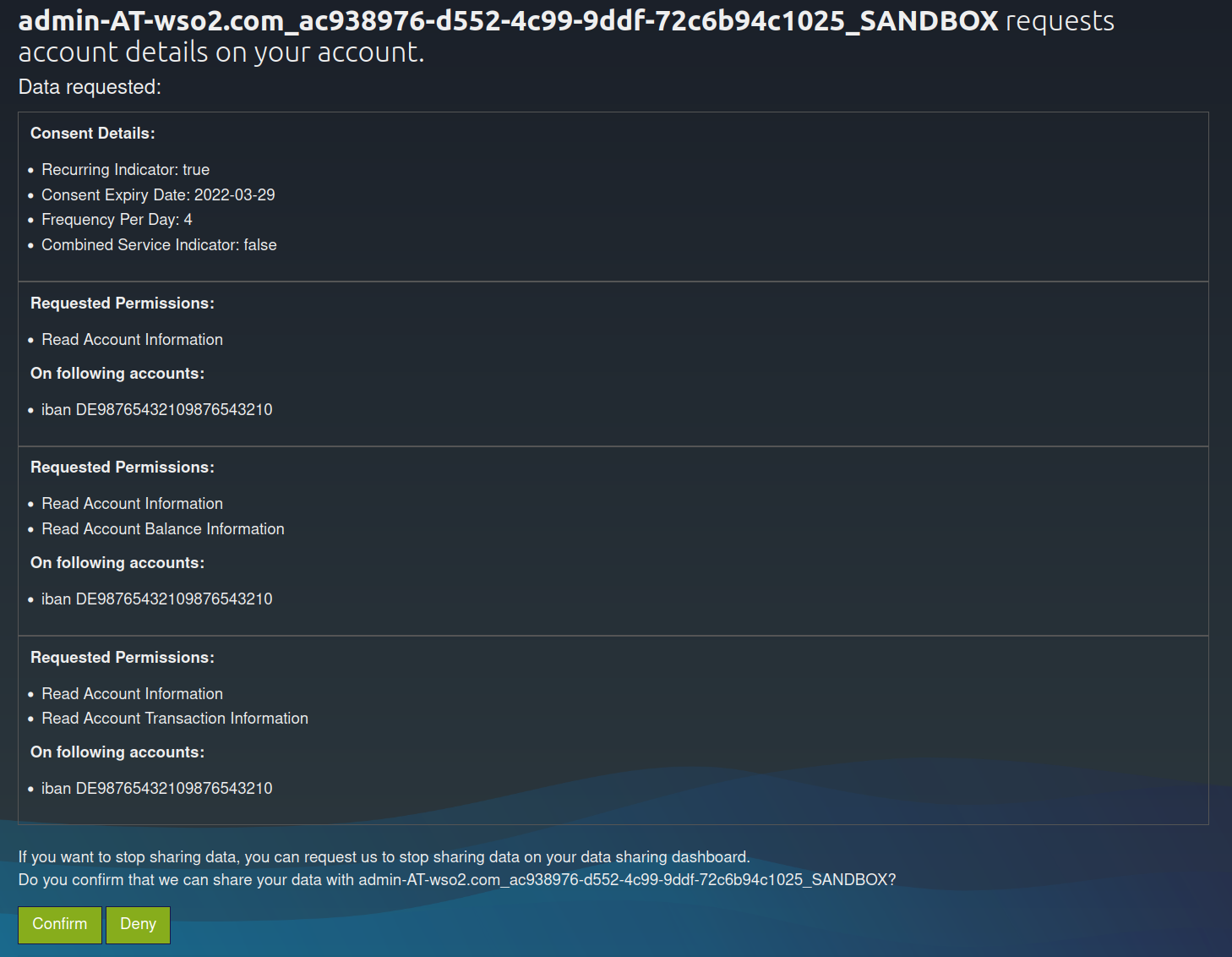
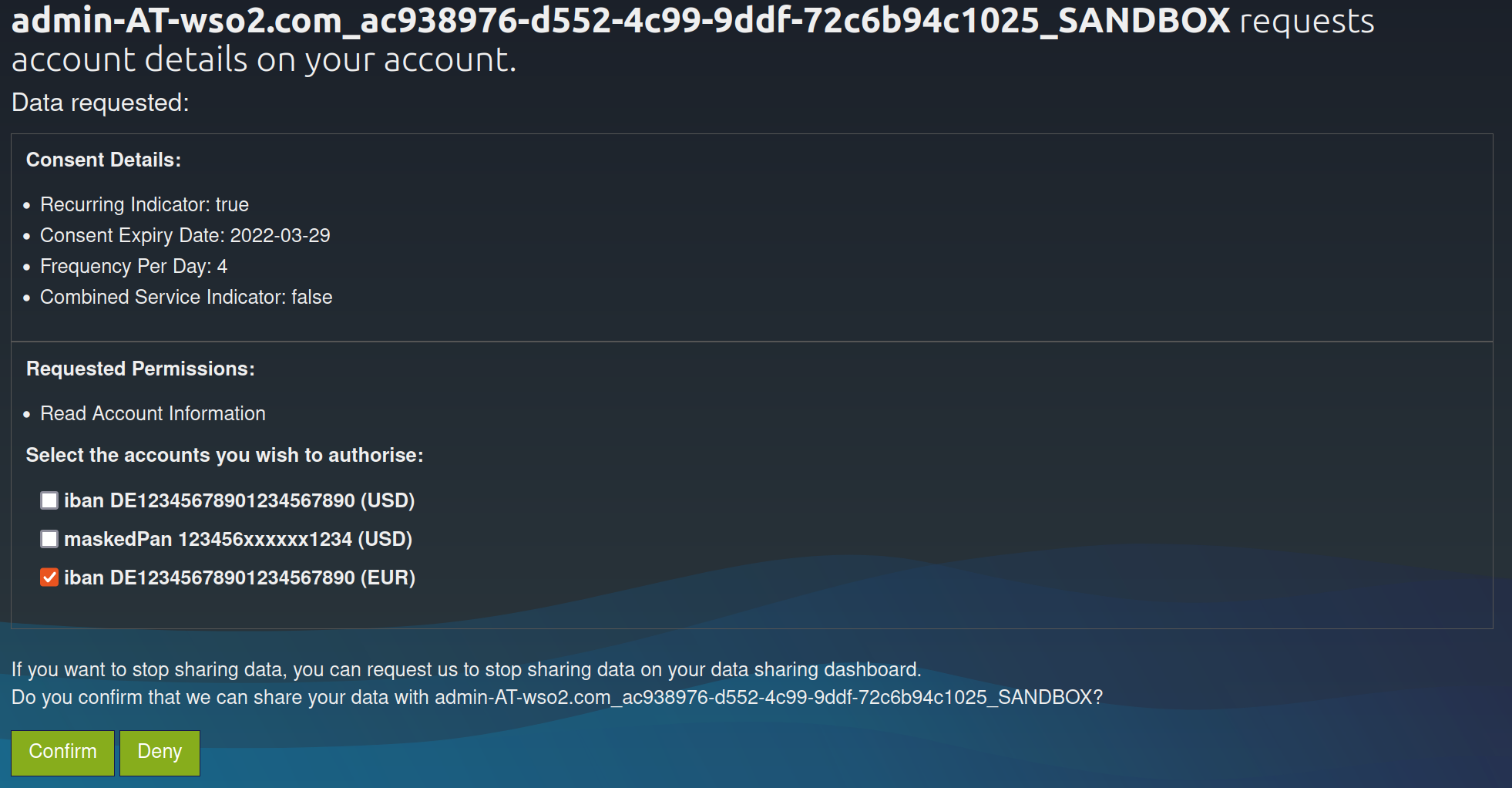
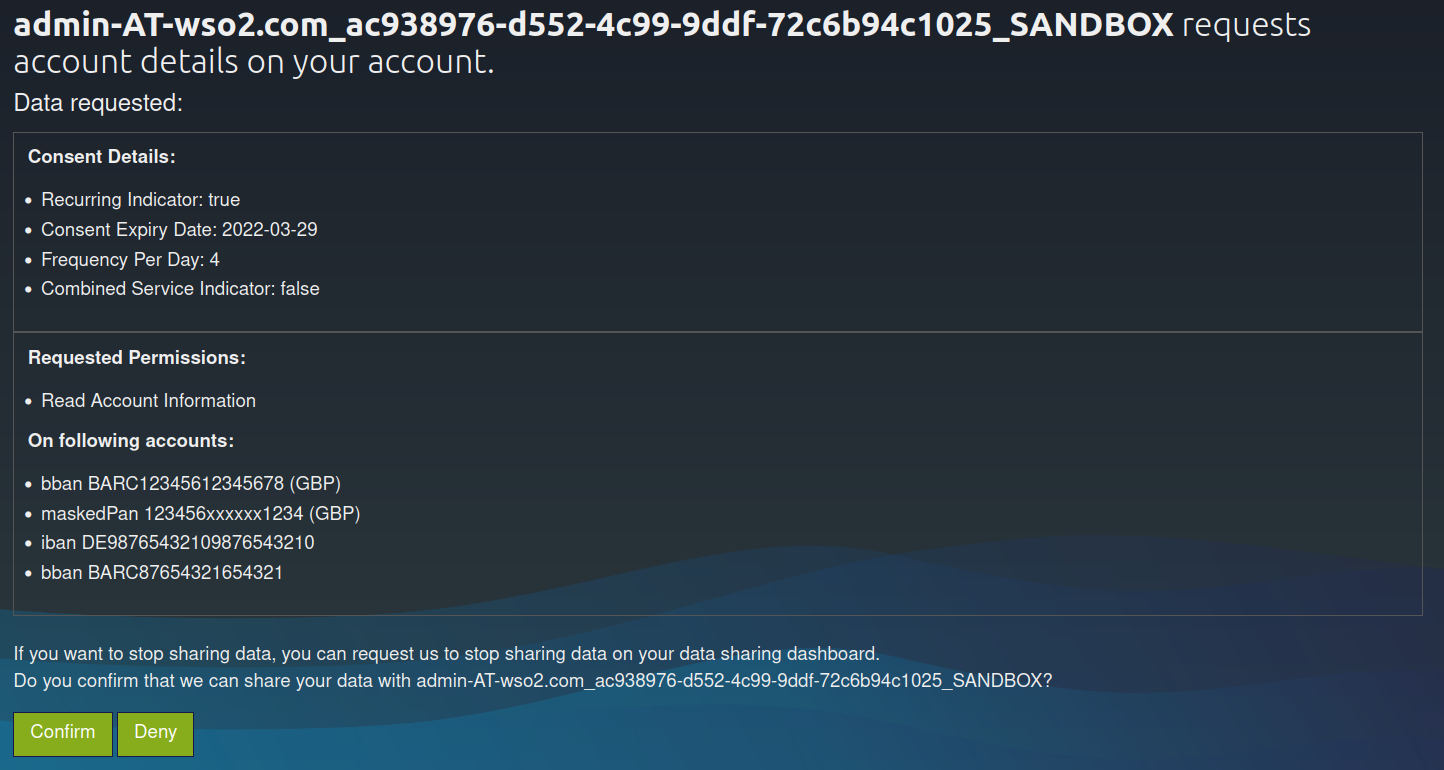
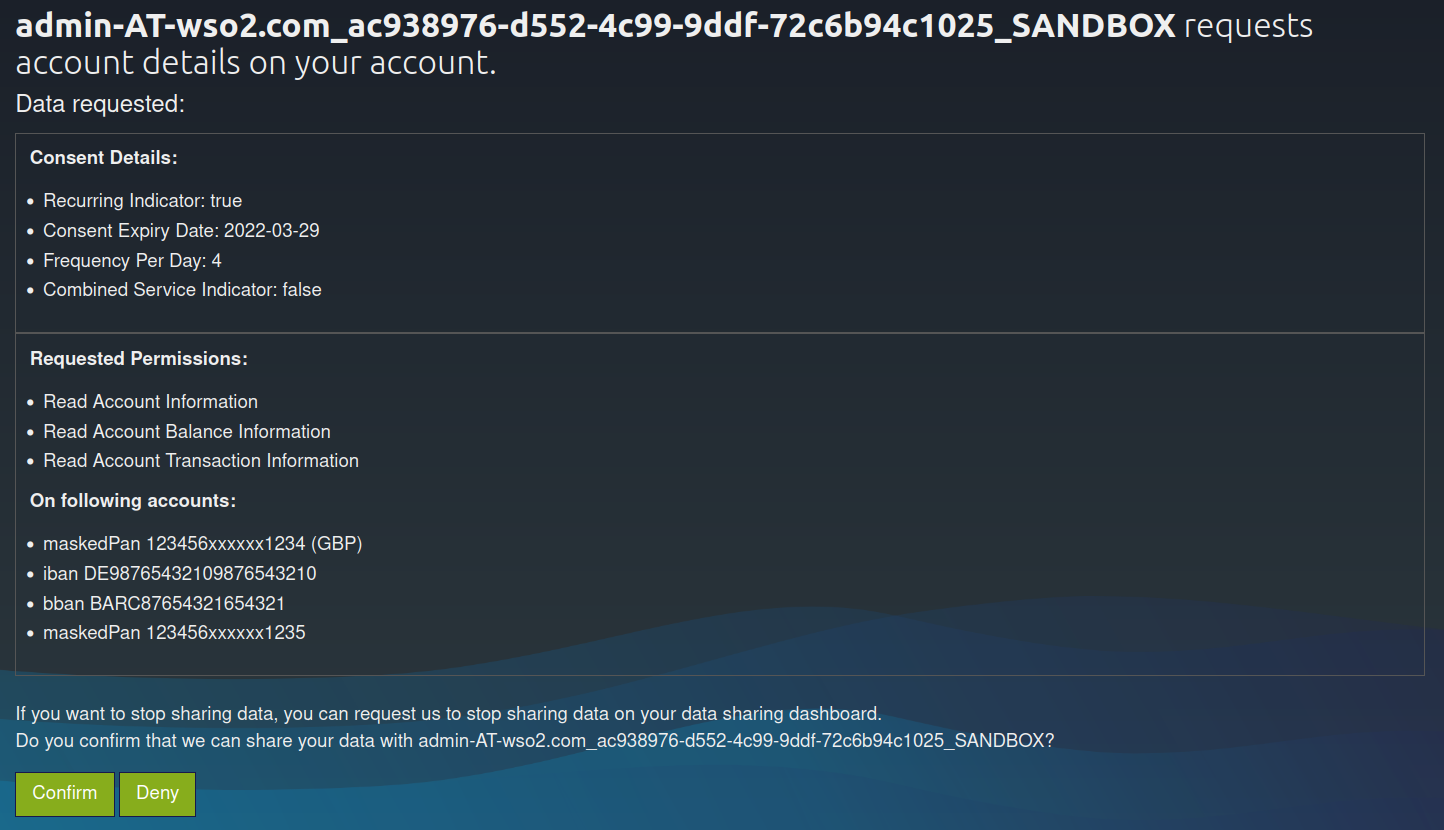
The page displays the data requested by the TPP for that particular consent along with its accounts and permissions.
- In a Bank offered consent scenario, the PSU is allowed to choose the accounts for the requested permissions.
- The consent page will slightly differ based on the different consent types.
Click here to see sample consent pages for different consent types
Dedicated accounts consent
Bank offered consent
Account list of available accounts consent
Global consent
-
Upon providing consent, an authorization code is generated on the web page of the
redirect_uri. See the sample given below:https://www.wso2.com/?code=5b771c49-dfe3-33f6-abe1-18f0426b8734&state=768ff3be-964c-41d9-9022-848ba379e1bfThe authorization code from the above URL is in the code parameter (code=
5b771c49-dfe3-33f6-abe1-18f0426b8734).
Generating user access token
In this section, you will be generating an access token using the authorization code generated in the section above.
-
Run the following cURL command in a command prompt to generate the access token. Update the placeholders with relevant values.
Use the sample certificates for testing purposes. Click here to see how it is done...
-
Download the cert.pem and upload it to the client trust stores as follows:
-
The client trust stores for the Identity Server and API Manager are located in the following locations:
<APIM_HOME>/repository/resources/security/client-truststore.jks-
<IS_HOME>/repository/resources/security/client-truststore.jks -
Use the following commands to add the certificate to the client trust store:
keytool -import -alias cert -file <PATH_TO_CERT.PEM> -keystore client-truststore.jks -storepass wso2carbon - Open the
<APIM_HOME>/repository/conf/deployment.tomlfile and update the following configurations. Add the relevant signature algorithm supported by the certificate to the following configuration. Sample certificate supportsSHA1withRSAsignature algorithm:
Configure the issuer of the certificate as below if the certificate needs to be skipped form revocation validation.supported_signature_algorithms = ["SHA256withRSA", "SHA512withRSA", "SHA1withRSA"]
Configure as below if the test certificates are used:[[open_banking.gateway.certificate_management.certificate.revocation.excluded]] issuer_dn = "EMAILADDRESS=<EMAIL_ADDRESS>, CN=<COMMON_NAME>, OU=<ORGANIZATIONAL_UNIT>, O=<ORGANIZATION>, L=<LOCALITY>, ST=<STATE/PROVINCE>, C=<COUNTRY>"[[open_banking.gateway.certificate_management.certificate.revocation.excluded]] issuer_dn = "[email protected], CN=OB, OU=OB, O=WSO2, L=COL, ST=WP, C=LK" -
Restart the servers.
-
Download the following certificates and keys, and use them for testing purposes. Use the transport private key and transport public certificate for Transport layer security testing purposes. Use the signing certificate and signing private keys for signing purposes.
curl -X POST \ https://<IS_HOST>:9446/oauth2/token \ --cert <TRANSPORT_PUBLIC_KEY_FILE_PATH> --key <TRANSPORT_PRIVATE_KEY_FILE_PATH> \ -d 'code=<GENERATED_CODE>&grant_type=authorization_code&redirect_uri=<REDIRECT_URI>&code_verifier=<CODE_VERIFIER>&client_id=<CLIENT_ID>' -
-
Upon successful token generation, you can obtain a token as follows:
 {
    "access_token":"eyJ4NXQiOiJOVGRtWmpNNFpEazNOalkwWXpjNU1tWm1PRGd3TVRFM01XWXdOREU1TVdSbFpEZzROemM0WkEiLCJraWQiOiJNell4TW1Ga09HWXdNV0kwWldObU5EY3hOR1l3WW1NNFpUQTNNV0kyTkRBelpHUXpOR00wWkdSbE5qSmtPREZrWkRSaU9URmtNV0ZoTXpVMlpHVmxOZ19SUzI1NiIsImFsZyI6IlJTMjU2In0.eyJzdWIiOiJhZG1pbkB3c28yLmNvbUBjYXJib24uc3VwZXIiLCJhdXQiOiJBUFBMSUNBVElPTl9VU0VSIiwiYXVkIjoiUFNER0ItT0ItVW5rbm93bjAwMTU4MDAwMDFIUVFyWkFBWCIsIm5iZiI6MTY0ODU0MTA2MiwiYXpwIjoiUFNER0ItT0ItVW5rbm93bjAwMTU4MDAwMDFIUVFyWkFBWCIsInNjb3BlIjoiYWNjb3VudHMgYWlzOmMwZDNkYThjLWRmNzctNDI0Zi1hYjAxLTBkZjQ3Mzg0NzEzYiIsImlzcyI6Imh0dHBzOlwvXC9sb2NhbGhvc3Q6OTQ0Nlwvb2F1dGgyXC90b2tlbiIsImNuZiI6eyJ4NXQjUzI1NiI6InliZXFhSW01MDBJTVB5MTlWa1BmSFJUSk50OXF2X1F0NWptSGR0LWJKbWMifSwiZXhwIjoxNjQ4NTQ0NjYyLCJpYXQiOjE2NDg1NDEwNjIsImp0aSI6IjNkN2I4YTE4LTcxMWMtNDljYi05YTE2LTViZjgzMjA5NGZjNCIsImNvbnNlbnRfaWQiOiJjMGQzZGE4Yy1kZjc3LTQyNGYtYWIwMS0wZGY0NzM4NDcxM2IifQ.ipVzAeTfHgDB3lgd7s06MD1GYAJec6anqwo-jiz99ucs9LxFHYVHK1XKpXB2YPx-R5FR_ssWGycqvQ4jima_QHjEI82us9l1c5o81L6y1EC_3jKuODEcigyxcmgha5MnnmAONgA9HT6o5bOQUBVSzjMogsvsF6MafyRUfItMXFJFwp_E-_tcSWprYq_1aMUa3sQuzBP1SpZxLUkbxp0mrtM3wgt9mBQVfhqGdqqwMH4l0iapA1O4cILDZTYlg29sEduznFwgqTbfygU5S_5Jd09NLyhFfwA96plEUbrGlQozcSiER2D6L3I8Rx2VkFYeKM9VlvOi3uIkq5THRC_gcg",
    "refresh_token":"5c5d0d00-eb31-38b6-ba97-4f46994051d9",
    "scope":"accounts ais:c0d3da8c-df77-424f-ab01-0df47384713b",
    "token_type":"Bearer",
    "expires_in":3600
 }
Invoking Account Information Service
Once the PSU approves the account consent, the AISP is eligible to access the account details of the PSU based on the provided permissions.
-
A sample request is as follows:
curl -X GET \ https://<APIM_HOST>:8243/xs2a/v1/accounts \ -H 'X-Request-ID: 4ace5a84-36bb-42a1-85be-e6b6c9f071cf' \ -H 'Date: Tue, 29 Mar 2022 14:07:22 IST' \ -H 'PSU-IP-Address: 127.0.1.1' \ -H 'Authorization: Bearer <USER_ACCESS_TOKEN>' \ -H 'PSU-ID: [email protected]' \ -H 'PSU-ID-Type: email' \ -H 'Consent-ID: 050c20c6-52b6-496a-84a9-d67d387f1e32' \ -H 'Accept: */*' \ -H 'Digest: SHA-256=RBNvo1WzZ4oRRq0W9+hknpT7T8If536DEMBg9hyq/4o=' \ -H 'Signature: keyId="SN=de730ec5733ead1b,CA=1.2.840.113549.1.9.1=#16116d616c7368616e694077736f322e636f6d,CN=OpenBanking Pre-Production Issuing CA,OU=OpenBanking,O=WSO2 (UK) LIMITED,L=COL,ST=WP,C=LK",algorithm="rsa-sha256", headers="digest x-request-id date psu-id",signature=ql2/nFpQHZsz9f3n0btTeCNEi8GZrKXiGYh8riti9BD6lyQwXJdl4oYXpNJb/Hz7O5jTflQ1nfQuCd4fTC3dn1ce8hU8Veo4i4mKOueoc6OAwBDioWIyGo3mJYUNW4lXKFU/dzpk33GowlVtB97OUcStk8z3LH1ukGcyR2wC5ucTJGa5OSEYOSsqOprb7xiiEHniUVfE3EmZ+k1xjWjbnplfU0lG+thxp1EFpssXOWouU3ha3gWLbHpoSPWjEGzOl2A4MUvk5Y8iHuWfneEXafVXO2b66CGWdoGzc20QX3qFzYrdEKWbIBF3tilbqYM3NoALVXURyPoKZ3NVj5BB+g==' \ -H 'TPP-Signature-Certificate: MIIFdzCCA1+gAwIBAgIJAN5zDsVzPq0bMA0GCSqGSIb3DQEBBQUAMIGsMQswCQYDVQQGEwJMSzELMAkGA1UECAwCV1AxDDAKBgNVBAcMA0NPTDEaMBgGA1UECgwRV1NPMiAoVUspIExJTUlURUQxFDASBgNVBAsMC09wZW5CYW5raW5nMS4wLAYDVQQDDCVPcGVuQmFua2luZyBQcmUtUHJvZHVjdGlvbiBJc3N1aW5nIENBMSAwHgYJKoZIhvcNAQkBFhFtYWxzaGFuaUB3c28yLmNvbTAeFw0yMjAxMTgwNzI4MzdaFw0yNDAxMTgwNzI4MzdaMHMxCzAJBgNVBAYTAkdCMRowGAYDVQQKDBFXU08yIChVSykgTElNSVRFRDErMCkGA1UEYQwiUFNER0ItT0ItVW5rbm93bjAwMTU4MDAwMDFIUVFyWkFBWDEbMBkGA1UEAwwSMDAxNTgwMDAwMUhRUXJaQUFYMIIBIjANBgkqhkiG9w0BAQEFAAOCAQ8AMIIBCgKCAQEA1rhjeBrT0+nb/VaHYrkgNodKUlShQvXHL8/sb1q+sVt459LqX8SDYemp01OWWKv45TBv9WtUVl8T08Zc2n5Q6ha7BKVjXaSsDhkXj7TrOAwBxRWnNjNivvyb4n4Gxek+AcgozEUFj1MHeIkgywEzP3DUNkbZiQjw7LFxLOy9Bh00f089DrCRHxEnUPka9BdRS9M0GWIuMVxn+FxmbZIl7wVxc8t2xFd4uWGtvBX1EbWLYJr1/j5fgjHCSmkj23Ar+6oqv2AKpp9HJ2aeYJozHRy+4asSjTuYeobULGIaSxgPGOJg4fprs+2UKpV2z2B6RMDf78WQJoGn+lm4wLtKWwIDAQABo4HTMIHQMA4GA1UdDwEB/wQEAwIGwDAdBgNVHQ4EFgQUIprePFwGvrdfcP6t14Y5TzPPgJowgZ4GCCsGAQUFBwEDBIGRMIGOMBMGBgQAjkYBBjAJBgcEAI5GAQYCMHcGBgQAgZgnAjBtMEYwRAYHBACBmCcBAQwGUFNQX0FTBgcEAIGYJwECDAZQU1BfUEkGBwQAgZgnAQMMBlBTUF9BSQYHBACBmCcBBAwGUFNQX0lDDBtGaW5hbmNpYWwgQ29uZHVjdCBBdXRob3JpdHkMBkdCLUZDQTANBgkqhkiG9w0BAQUFAAOCAgEAsuTEC6j8u7lGEpSeVekcUXby9DPRaI6He7MW2K9f6nz12nleyUnvQVQqoFUF+kywRgGpIP/9HsI12NYwLVfgm9LJWR+ObBMWDH1OUqgxgy+Pj4+udiR8FJQsEdY6eF4lgfQq6SU+naMFCcJhuIFEVjItiC71nVg2PPdaXRwxOlXhuIpfW3DdIaELNffoVKYxnx/wpRGRAbTFI87pDdqZ/2sbkbnt4Lq+7VIQmdqqrMCIvPqh8n6/I5xotq8kPbBcf7/1wjUDClqX5chBh89sxZhIyRtOq3HiVzQ2c6sYgA640LsxHB4yPWFDv5tPnzohmDmfCYcvbSZhsGm+hlyjaf8/gN8cG+ui7PFKuyI0NUnR3rD88gIzl2lT1Wtw9f2eFkS8NSnB3ENhRYPLcvZDePktOjkj5PEqo4OTZgGnoMzXNvzWaABrcpzw7a1WF7swvvZavUg9bvFbbeVloDZj4w9ODICoe/Sy+2nZBRTVzIHGJ4kNzscXXSMsSD9sXZMT/JmmD+cs/X/9SJzAsunXqpHbTB9PiGWdR7rhk6e0ddwwTa7wLs/h2MOP8LyTVaHQtNXe8x54YwDCP98dZ1G76iLKIZoU84aYcGp7E8tlQl05UhunlTNe+WxWvBt9tWeotaOomSqGRWDk+4j5z91NoFuFQ81aDAJxB8RYI2I1sk8=' \ -H 'Content-Type: application/json; charset=UTF-8' \ --cert <TRANSPORT_PUBLIC_KEY_FILE_PATH> --key <TRANSPORT_PRIVATE_KEY_FILE_PATH> -
The above request retrieves all the account information for all the accounts related to the consent of this PSU. Given below is a sample response:
{
   "accounts":[
      {
         "resourceId":"3dc3d5b3-7023-4848-9853-f5400a64e80f",
         "iban":"DE2310010010123456789",
         "currency":"EUR",
         "product":"Wso3123",
         "cashAccountType":"CurrentAccount",
         "name":"Main Account",
         "_links":{
            "balances":{
               "href":"/accounts/3dc3d5b3-7023-4848-9853-f5400a64e80f/balances"
            },
            "transactions":{
               "href":"/accounts/3dc3d5b3-7023-4848-9853-f5400a64e80f/transactions"
            }
         }
      },
      {
         "resourceId":"3dc3d5b3-7023-4848-9853-f5400a64e81g",
         "iban":"DE2310010010123456788",
         "currency":"USD",
         "product":"Fremdwährungskonto",
         "cashAccountType":"CurrentAccount",
         "name":"US Dollar Account",
         "_links":{
            "balances":{
               "href":"/accounts/3dc3d5b3-7023-4848-9853-f5400a64e81g/balances"
            }
         }
      }
   ]
}
Account Information Service endpoints
Listed below are the Account Information Service (AIS) endpoints you can invoke:
/accounts: Read all account information/accounts/{account-id}: Read specific account information/accounts/{account-id}/balances: Read balance information of a specific account/accounts/{account-id}/transactions: Read transaction information of a specific account/accounts/{account-id}/transactions/{transactionId}: Read specific transaction information of a specific account/card-accounts: Read all card account information/card-accounts/{account-id}: Read specific card account information/card-accounts/{account-id}/balances: Read balance information of a specific card account/card-accounts/{account-id}/transactionsRead transaction information of a specific card account/accounts?withBalance: Read all account information with the booking balance information/accounts/{account-id}?withBalance: Read specific account information with the booking balance information/accounts/{account-id}/transactions?withBalance: Read transaction information of the specific account with the booking balance information